How to Play A Stray Line
Exploration, dialogue, and spell battles — how the adventure loop fits together.
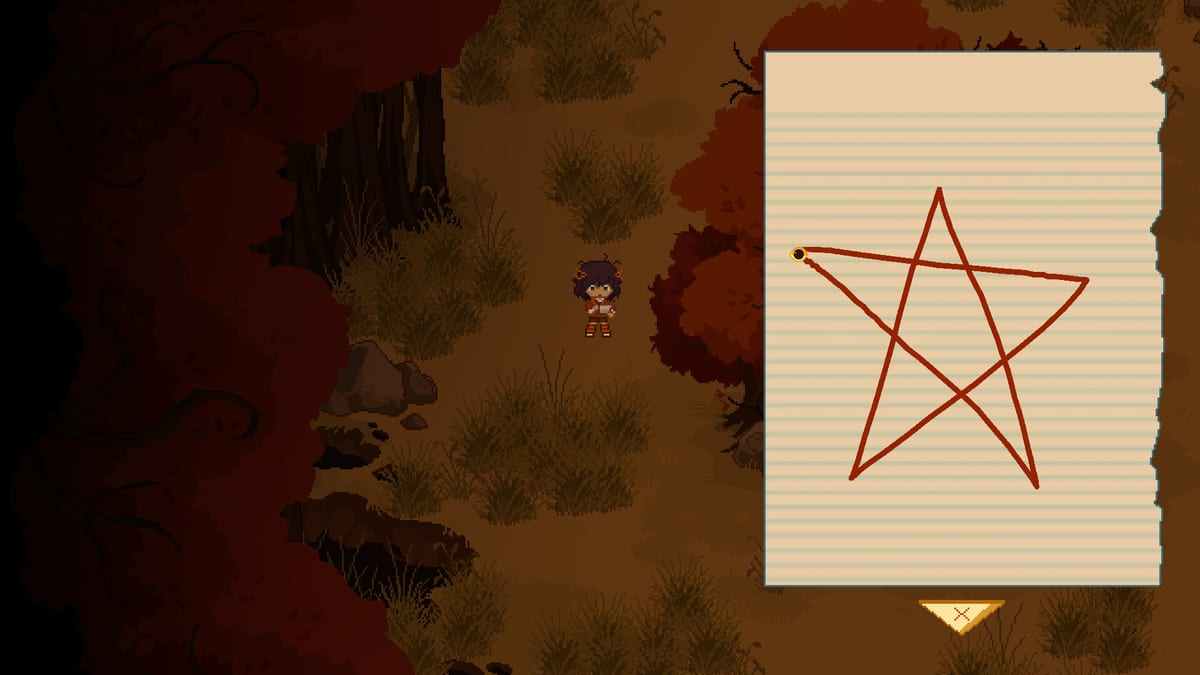
A Stray Line alternates between quiet point-and-click investigation and sudden real-time drawing battles where projectiles force you to trace symbols under pressure. Understanding that rhythm early prevents frustration when the game swaps from cozy domestic scenes — Taoyi at home with Atlas, Winslow, neighbors like Mr. Ilya, and The Tube — into body-horror set pieces. This guide explains how to play at a systems level so you can jump from Getting Started into spell practice and boss prep without guessing which mode you are in.
Sprout Haven builds the full story across four chapters, each ending in one major boss. The Chapter 1 demo targeted for August 2026 will likely showcase the core loop even if later chapters add twists. Where demo-specific hotspots are still unknown, we describe habits that survive launch patches rather than fake step lists.
Core gameplay loop
Most sessions follow a repeating pattern:
- Explore a location with mouse-driven pointing (keyboard shortcuts may mirror common adventure conventions — confirm in settings at launch).
- Examine objects, art supplies, and environmental storytelling tied to Atlas’s painting and magic background.
- Talk to family and neighbors to unlock new areas, emotional context, or notebook tutorials.
- Collect clues — notes, sketches, keys — that gating systems expect you to connect manually.
- Draw spells when the notebook appears, either in scripted teaching moments or combat.
- Survive battles by completing symbols quickly enough to counter incoming projectiles.
- Progress until the chapter boss consolidates everything you learned.
The loop rewards thoroughness. Point-and-click veterans who skim dialogue may miss spell hints embedded in casual lines from Winslow or Ilya. Slow down when someone mentions Atlas’s injuries or an odd neighbor behavior; those beats often foreshadow mechanical tutorials.
Point-and-click exploration
Adventure segments emphasize cursor precision and readable hotspots. Hover until interactable outlines or labels appear — exact UI styling may change in the demo, but the design intent is legibility over pixel hunting.
Examination depth matters. First clicks might give a short description; repeated or combined interactions could reveal hidden layers on canvases, tubes, or household clutter. Keep a real notebook beside your keyboard if you like paper tracking; Taoyi’s in-game journal is separate from the spell notebook but equally worth checking after major scenes.
Dialogue choices, if present, likely nudge tone rather than binary outcomes in early chapters — Sprout Haven’s marketing emphasizes character over branching chaos. Still, exhaust conversation trees before leaving an area. Missing one line can delay notebook unlocks in adventure games even when story branches are modest.
Spell notebook and combat transitions
Combat is not a separate mini-game bolted onto the side. It flows from narrative pressure — when Taoyi must defend herself or others, the spell notebook opens and symbols become your toolkit.
Between fights, study How to Draw Spells to build stroke confidence on mouse, touch, or tablet. Enter battles knowing which symbols the chapter introduced so far; the demo will probably teach a small kit before the boss tests combinations under stress.
When projectiles spawn:
- Prioritize survival shapes that clear or block threats before decorative buffs.
- Keep strokes compact — oversized doodling costs time you do not have.
- Watch telegraphs — color, sound, and wind-up animations usually repeat across a fight.
Detailed boss mindset lives in How to Beat Bosses; this page stays focused on switching mental gears between exploration calm and combat focus.
Controls and input devices
Official materials list mouse and keyboard as primary, with touch and drawing tablets supported.
| Input | Best for | Notes |
|---|---|---|
| Mouse | Precise pointing, quick clicks | Default reference for UI layout |
| Keyboard | Shortcuts, menu navigation | Rebind if offered at launch |
| Touch | Spell tracing on supported displays | Test sensitivity in calm scenes first |
| Drawing tablet | Smooth symbol curves | Map pen buttons to undo or notebook toggle if available |
There is no requirement to match Atlas’s in-fiction painting skill with your hardware. Pick the device that keeps symbols recognizable under pressure. If you switch devices mid-chapter, replay tutorial prompts in a safe room so muscle memory matches.
Platform requirements
Plan on Windows 10 64-bit or macOS 10.15+ with roughly 6 GB free storage per the Steam listing. Close background drawing or streaming tools if you notice input lag during battles — real-time drawing battles punish latency more than static adventure scenes.
Pacing a demo session
Chapter 1 will likely mix long readable segments with short intense fights. Budget time accordingly:
- First sitting (30–60 minutes): Introduce household, basic movement, first spell tutorial.
- Second sitting: Exploration-heavy middle with neighbor beats involving Ilya or The Tube.
- Final stretch: Boss approach — review How to Complete Chapter 1 for milestone tracking and How to Beat Bosses for fight fundamentals.
Save after every major beat once the demo allows manual saves or checkpoint clarity is confirmed.
Mature themes and player comfort
Mechanics do not negate content warnings. Illustrated gore, dissociation, children in distress, death, and cursing appear alongside found-family warmth. Pause exploration if a scene hits too hard; adventure games rarely punish short breaks, and stepping away beats pushing into dissociative discomfort.
Common mistakes before launch
- Rushing dialogue and missing spell hints tied to Atlas’s recovery arc.
- Ignoring art objects that mirror symbol shapes taught later.
- Practicing spells only in combat instead of calm notebook moments.
- Assuming every neighbor is hostile — The Tube’s oddity may be narrative misdirection rather than immediate combat prep.
Where to go next
- How to Draw Spells — symbol accuracy, drills, device tuning
- How to Beat Bosses — one boss per chapter, universal patterns
- How to Complete Chapter 1 — demo checklist without spoiler solutions
- Guides Hub — full index when new chapters arrive
Official updates still belong on Kickstarter and Discord; treat this wiki as structured practice material, not a substitute for patch notes.
Frequently Asked Questions
Quick answers drawn from what players ask most.
Is A Stray Line turn-based or real-time?
Exploration is traditional point-and-click pacing, but spell battles run in **real time** — projectiles move while you draw symbols in the notebook.
Can I play entirely with a keyboard?
Mouse and keyboard together are the stated primary setup. Keyboard likely handles movement shortcuts and menus; pointing still expects a cursor device unless the demo adds full keyboard navigation.
How many chapters are planned?
Sprout Haven plans **four chapters**, each with **one major boss**. The **Chapter 1 demo** is the first public slice, targeted for **August 2026**.
What if I fail a drawing battle?
Expect retries or checkpoint reloads — exact failure rules will be confirmed in the demo. Use losses to memorize projectile timing rather than skipping straight to spoiler guides.
Which guide covers symbol shapes in detail?
How to Draw Spells focuses on notebook mechanics, input devices, and practice drills before boss encounters.